How to Find the Hiring Manager’s Email: 4 Ways That Actually Work
Your application doesn’t have to disappear into an inbox no human ever opens. Here’s how to find the person behind the role — and reach them directly.

You found a role you actually want. You polished the resume, wrote the letter, hit submit — and then nothing. No confirmation that mattered, no reply, no sign a person ever laid eyes on it. The uncomfortable truth is that most applications land in a queue that gets skimmed by software and a recruiter under time pressure. The single best way to change that outcome is also the one most people skip: get your application in front of an actual human — the hiring manager or recruiter — directly.
The catch, of course, is that companies don’t exactly publish a “email this person” button next to every job. So finding the right address can feel like detective work. Good news: there are four reliable ways to do it, ranked here by how much effort they take versus how dependably they work. We’ll walk through each, then show how CVApplyr collapses the whole hunt into a single tap.
Why finding the right email is so hard
Job postings are deliberately anonymous. A listing says “Acme is hiring a Senior Analyst,” not “email Priya, the Director of Analytics.” That’s partly to protect employees from a flood of cold messages, and partly because the posting often routes through a third-party applicant-tracking system that never exposes a name. So the information you need — who owns this role and how to reach them — is scattered across LinkedIn, the company site, and the open web, and you have to reassemble it yourself for every single application.
That friction is exactly why so few candidates bother — and exactly why doing it well makes you stand out. When the average opening pulls in around 250 applicants (Glassdoor) and only a handful reach an interview, the candidates who reach a real person aren’t playing the same game as everyone in the queue. Let’s make that reachable.
The 4 ways to find a hiring manager’s email
Here’s how the four methods stack up. Earlier methods are free but fiddly; later ones trade a little setup for far more reliability.
1. Guess (and verify) the company email pattern
Almost every company uses one consistent format for its addresses. Crack the pattern once and you can construct anyone’s email. The usual suspects:
first.last@company.com— by far the most commonfirst@company.com— common at smaller startupsflast@company.com— first initial + last namefirstlast@company.comorlast.first@company.com
To find the pattern, you only need one known address at the company — a press or careers contact on their site, a “contact us” page, or someone on the team you can spot in a public profile. Once you have the format and the hiring manager’s name, you’ve got a strong candidate address. The catch: a guess is only a guess until it’s confirmed, which is where method three comes in.
2. Track the person down on LinkedIn
LinkedIn is the fastest way to figure out who the role belongs to, even if it won’t hand you an email. Open the job and look for “Meet the hiring team,” which sometimes names the recruiter outright. No luck? Search the company plus a title like “Engineering Manager” or “Head of Marketing,” and the right person usually surfaces. A short, genuine connection note or InMail can work on its own — and the name you find here is the input you feed into your pattern guess from step one.
One thoughtful message to the right person beats fifty applications shouted into the void. The whole job of these four methods is to find that one person.
3. Use an email-finder or verifier tool
Several tools take a name and a company domain and return — or confirm — a likely email, then check that it actually resolves to a real mailbox. This is what turns a pattern guess into a pattern you can trust before you hit send. The trade-off is the usual one: free tiers are limited, you’re juggling another browser tab, and you’re still doing this manually for every single role. Reliable, but it adds up fast across a real job search.
4. Let CVApplyr surface a contact for the role
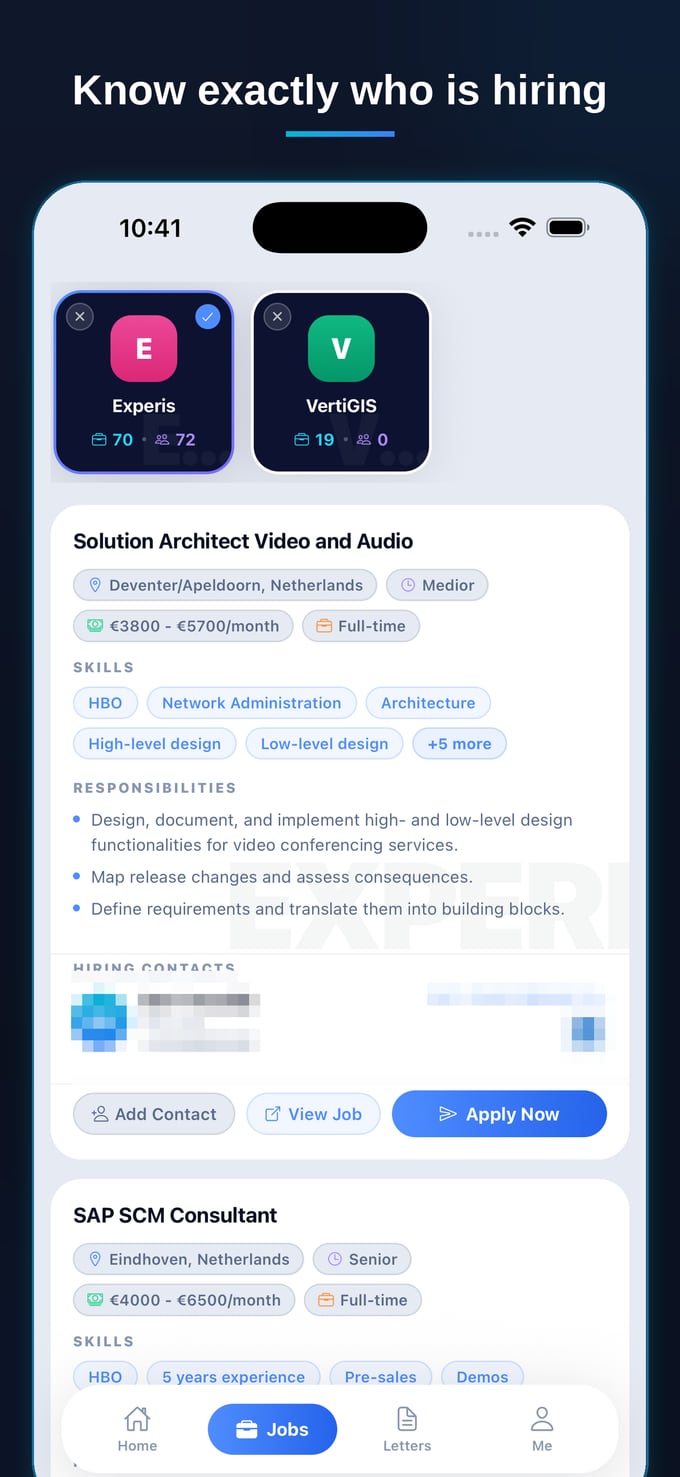
Here’s the shortcut that skips all of the above. For many roles, CVApplyr surfaces a recruiter or hiring-manager contact right next to the listing — so the detective work is already done. You see who’s hiring, add them to your tracker with one tap, and send a tailored application or follow-up without ever leaving the screen where you found the job. Instead of stitching together LinkedIn, a pattern guess, and a verifier tab, you get the contact and the role in one place.
That’s the difference between “submitted, fingers crossed” and an actual line to a person. The screenshot at the top of this article shows it in action: a live role, the hiring contacts attached to it, and Apply Now sitting right there. No black hole.
What to actually say once you’ve got the email
Finding the address is half the win; the message is the other half. Keep it short — three or four sentences. Lead with the specific role and why you’re a genuine fit (one concrete, relevant detail beats three vague claims). Make a single, low-friction ask, like “Would it be worth a quick chat?” Attach your resume, sign off, and stop. Hiring managers are busy, not hostile — a crisp, relevant note about a real role is welcome far more often than candidates fear.
And because you found the role and the contact in the same place, your follow-up isn’t an archaeology project through your sent folder a week later — it’s a tap on a status you already saved. That’s the part most people abandon, and it’s where a surprising number of interviews actually get won.
Stop applying into a black hole
Find matching jobs, see who’s hiring, and reach a real contact — with a tailored cover letter ready to send. Free to start.
Download CVApplyrFrequently asked questions
How do I find the hiring manager’s email address?
Start by working out the company’s email pattern (often first.last@company.com or first@company.com), then confirm the right person on LinkedIn or the careers page. An email-finder tool or verifier can check the address resolves. Or skip the detective work entirely and let CVApplyr surface a recruiter or hiring-manager contact for the role so you can apply directly.
What are common work email formats?
The most common formats are first.last@company.com, firstlast@company.com, first@company.com, and flast@company.com (first initial plus last name). A few companies use last.first@ or first_last@. Find one known address at the company — a press contact or a team member on LinkedIn — and the same pattern usually applies to everyone.
Is it OK to email the hiring manager directly?
Yes, as long as you’re brief, relevant, and respectful of their time. A short, specific note about a role you’ve applied for — why you’re a fit and a one-line ask — is welcome far more often than people fear. Avoid mass-blasting generic messages; one tailored email to the right person beats ten copy-pasted ones.
How does CVApplyr find a contact for a role?
For many roles CVApplyr surfaces a recruiter or hiring-manager contact alongside the listing, so you can reach a real person instead of applying into a black hole. You can view the contact, add it to your tracker, and send a tailored application or follow-up — all from the same screen where you found the job.