How to Track 50+ Applications Without Losing Your Mind
The spreadsheet wasn’t the problem. The problem is that any tracker you have to update by hand quietly dies the week your job search gets serious.

You started so organized. A clean spreadsheet, neat columns — company, role, date, status, link. By the third day of real applying it looks like a crime scene: half-filled rows, a status column frozen on "applied," two duplicates of the same job, and a sinking suspicion you forgot to log the one role you actually care about. Somewhere in there is a recruiter who replied four days ago, waiting on a follow-up you never sent because you didn't know it was owed.
This is the quiet failure mode of a high-volume job search. Applying is hard, but remembering what you applied to — and what each one now needs from you — is what actually breaks people. When you're sending 50, 80, 100 applications, your memory is not a system. And the spreadsheet only works while you have the energy to feed it, which is exactly the energy a job search drains first.
Why tracking falls apart at scale
Here's the uncomfortable truth: a tracker that depends on you to update it will fail, not because you're lazy, but because updating it is friction at the worst possible moment. You just spent twenty minutes wrestling a cover letter and an application form — and now the system asks you to alt-tab to a spreadsheet and type the whole thing in again? You'll do it for a day or two. Then you won't.
And the moment a few rows go stale, the entire sheet loses your trust. Is this role still open? Did I already apply here? Did they reply? Once you can't answer those at a glance, you stop opening the sheet at all — and you've gone fully blind right when your pipeline is at its biggest. The breakdown isn't dramatic. It's just a slow drift from "tracked" to "I think I applied there?"
There's a second, sneakier failure too: the spreadsheet lives somewhere other than where you apply. You apply on a careers page, in your email, on a portal — and the record of it sits in a separate file you have to remember to open and update. Every application creates a tiny bookkeeping debt, and like all debt it compounds. By role number twenty, you owe the sheet so many updates that catching up feels worse than starting over. So you don't.
The hidden cost of a dead tracker
An abandoned tracker doesn't just lose data — it loses opportunities. The follow-up email you never sent. The recruiter reply that aged out. The role you applied to twice (and the one you meant to apply to and didn't). In a search where reaching a real person already moves the needle, dropping the thread on the people who did respond is the most expensive mistake you can make.
What a 50-application search actually needs to track
Before fixing the how, it helps to name the what. For each role, you only need five things — but you need all five, current, in one place:
- The role — company and title, so you can tell two "Product Manager" applications apart.
- The status — applied, replied, interviewing, or closed. This is the column that goes stale first.
- The contact — the recruiter or hiring manager you reached, or could reach, for this role.
- A note — one line: "referred by Sam," "asked about relocation," "phone screen Tuesday."
- A follow-up date — the single most-skipped field, and the one that turns "applied" into "interviewing."
Five fields. That's not a lot of data. The problem was never the schema — it's that keeping those five fields accurate across 50 rows, by hand, while you're busy applying, is a second job. So let's remove the hand.
The fix: a tracker that fills itself in
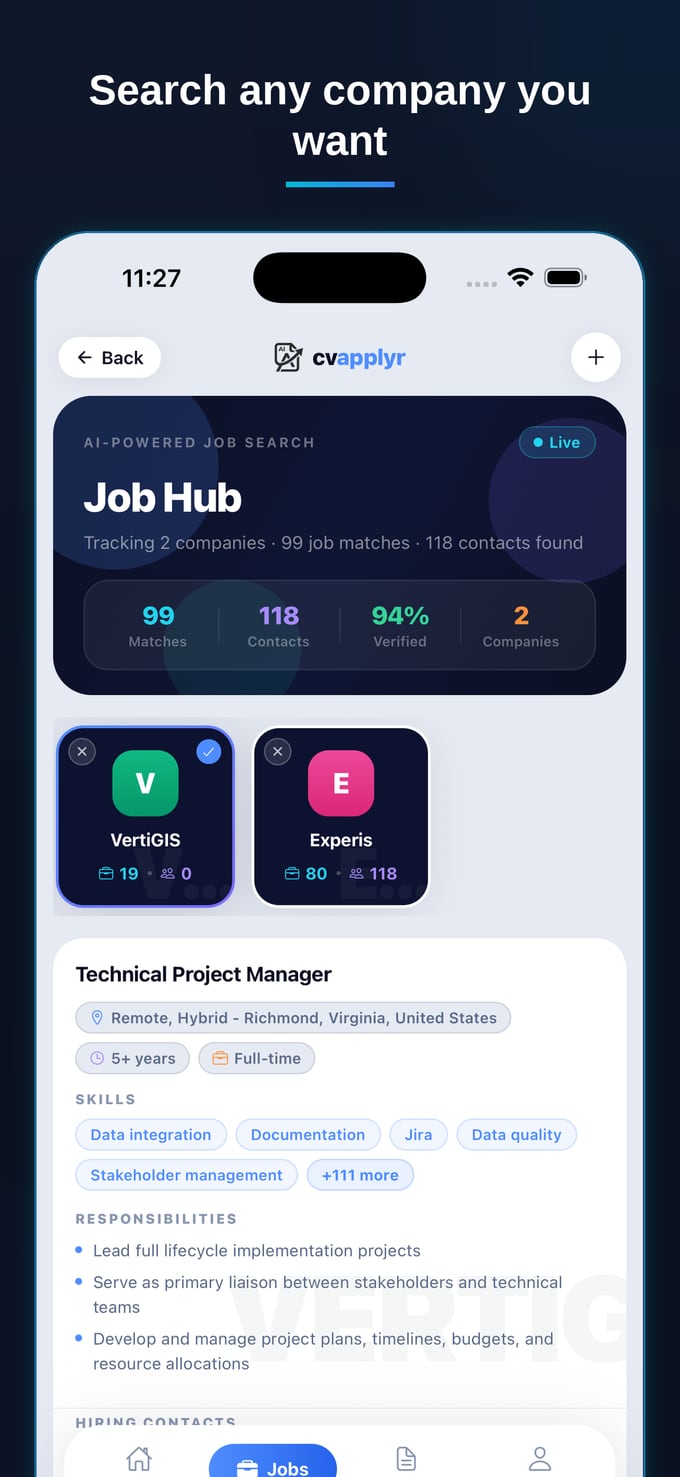
The whole problem with manual tracking is the gap between where you apply and where you log it. Close that gap — make applying and tracking the same action — and the upkeep problem disappears. That's exactly how CVApplyr's Job Hub works: every role you act on is saved automatically, with its status, contacts and notes attached. There's no spreadsheet to maintain because there's no separate step to forget.
1. Applying is logging
When you apply to a role through CVApplyr, it's already tracked. The company, the title, the date, the status — captured the moment you hit apply, not in a separate chore afterward. The Job Hub above is just that: a live record of everything you've acted on, sorted so the things that need you are on top. You never type a row again.
2. The contact rides along with the application
This is the part a spreadsheet can't really do. Because CVApplyr surfaces a recruiter or hiring-manager contact for a role when you apply, that contact is saved with the application. So when it's time to follow up, you're not hunting through LinkedIn trying to remember who you spoke to — the person is right there next to the role, ready for a one-tap message.
3. Status and notes stay current at a glance
Each role carries its own status and a notes field, so "where does this stand?" is answerable in a second, not an excavation. Mark something as replied or interviewing and the hub reorders itself around what's live. No stale rows, no second-guessing whether you already applied somewhere — the duplicate-application trap simply can't happen when the hub remembers for you.
4. Follow-ups stop slipping through
The single highest-leverage thing in a job search is following up on the people who replied — and it's the first thing a manual tracker drops. When your applications and their contacts live together with current statuses, the roles that need a nudge surface on their own instead of hiding in a frozen spreadsheet row. You're no longer relying on memory to tell you that Globex wrote back on Thursday. The hub already knows, and it puts that role where you'll see it. In a field of roughly 250 applicants per opening, being the candidate who follows up — promptly and to the right person — is a genuine edge, and it costs you nothing but a tap once the tracking runs itself.
Tracking 50 applications by hand isn't a discipline problem — it's a design problem. Make the application track itself, and the number stops mattering. 50 feels exactly like 5.
What this looks like on a Tuesday night
Picture the difference. The old way: you finish applying, stare at a spreadsheet you haven't updated in three days, and decide future-you will deal with it (future-you won't). The new way: you open the Job Hub, see one role flagged replied — follow up with the recruiter's name already attached, send a two-line message, glance at three statuses that moved, and close the laptop. The pipeline tracked itself while you were busy living. That's the whole point — your energy goes into the applications and the conversations, not the bookkeeping.
Let your job search track itself
Apply, save the contact, and keep every role’s status and notes in one Job Hub — free to start.
Download CVApplyrFrequently asked questions
What’s the best way to track job applications?
The best tracker is the one you’ll actually keep open. That means it should record itself: when you act on a role, the status, the contact and your notes should be saved automatically, not typed into a spreadsheet by hand. A live job hub that captures every application the moment you apply beats any document you have to remember to update.
Why do job-search spreadsheets fail?
Spreadsheets fail because they rely on perfect manual upkeep at exactly the moment you’re busiest. Every new row is friction, so after a few days of applying you stop logging — and once a few rows are stale you stop trusting the whole sheet. They also separate your tracking from where you actually apply, so the data is always one copy-paste behind reality.
What should I track for each application?
For each role, capture five things: the company and title, the date you applied, the current status (applied, replied, interviewing, closed), the contact you reached or could reach, and a short note plus a follow-up date. That’s enough to send a confident follow-up later without re-digging through your sent folder.
How does CVApplyr track applications for me?
Every role you act on in CVApplyr is saved to your Job Hub automatically — with its status, the recruiter or hiring-manager contact, and your notes attached. Nothing to copy, nothing to remember. You open the hub, see exactly where each application stands, and follow up in a tap.