What to Do After You Apply (The Step Most People Skip)
Hitting submit feels like the finish line. It's actually the starting gun — and the runners who keep moving are the ones who get the replies.

You found a role you actually want. You tailored the resume, wrote the cover letter, filled in the endless form fields, and clicked Submit. A little wave of relief — and then nothing. The application disappears into a system you can't see, and you move on to the next one. Two weeks later you can't even remember whether you applied here or just bookmarked it. That gap — between hitting submit and hearing back — is where most job seekers quietly lose roles they were perfectly qualified for.
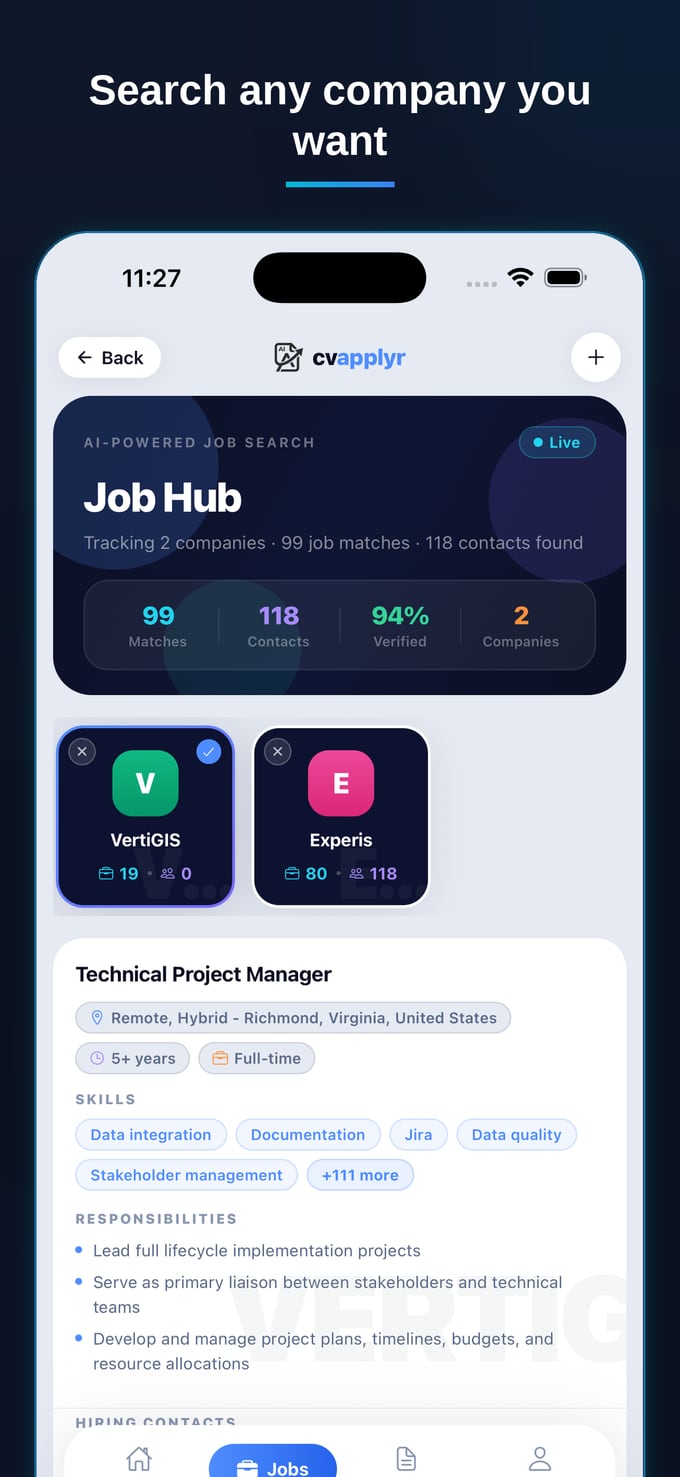
Here's the uncomfortable truth: submitting the application is the easy part, and it's also the part with the least leverage. The candidates who get callbacks aren't always the strongest on paper — they're the ones who did three small things after they applied. Let's walk through exactly what those steps are, why almost everyone skips them, and how to make them automatic.
Why "submit and pray" doesn't work
The average corporate job opening attracts around 250 applicants, and only a handful ever reach a real conversation (Glassdoor). When you submit through a portal, your resume joins a queue inside an applicant-tracking system, gets a 6–7 second first-pass scan if a human sees it at all (Ladders eye-tracking study, 2018), and then waits. You've done real work and handed control to a black box.
The after-apply steps exist to take a sliver of that control back. They're not about being annoying or "spammy" — they're about turning an anonymous row in a database into a person a recruiter recognises. The problem isn't that people don't know follow-up matters. It's that, by the time you've ground through ten applications, you have zero energy left to research contacts, write outreach, and build a tracking system. So the highest-leverage steps are exactly the ones that get cut.
The three steps that change your odds
You don't need a complicated CRM or a 40-step "networking funnel." After every application, do three things — reach a person, follow up on a schedule, and keep one source of truth so you actually remember to. Here's the rhythm, and how CVApplyr handles each piece so it happens without willpower.
1. Day 0 — reach a real person, not the void
The single highest-leverage thing you can do after applying is to land in an actual inbox. Studies consistently suggest referred and directly-contacted candidates are hired at far higher rates than cold applicants (Jobvite / iCIMS) — and you don't need a personal connection to borrow a little of that effect. A short, warm note to the recruiter or hiring manager — "Hi, I just applied for the X role and wanted to flag how genuinely interested I am; happy to share anything that helps" — moves you from row in a database to name with a face.
The reason almost nobody does this is simple: finding the right person and their email is tedious detective work. That's exactly the friction CVApplyr removes — it surfaces a recruiter or hiring-manager contact for the role, then drafts the outreach for you with your resume and cover letter already attached. The detective work disappears; the human touch stays.
And it doesn't have to be a perfect message. A good first note is short, specific, and low-pressure: name the exact role and reference number if there is one, say in a single line why you're a strong fit, and close with an offer rather than a demand — "happy to send my portfolio or jump on a quick call if useful." That's it. You're not asking the recruiter to do anything; you're making it effortless for them to remember you when they open the pile.
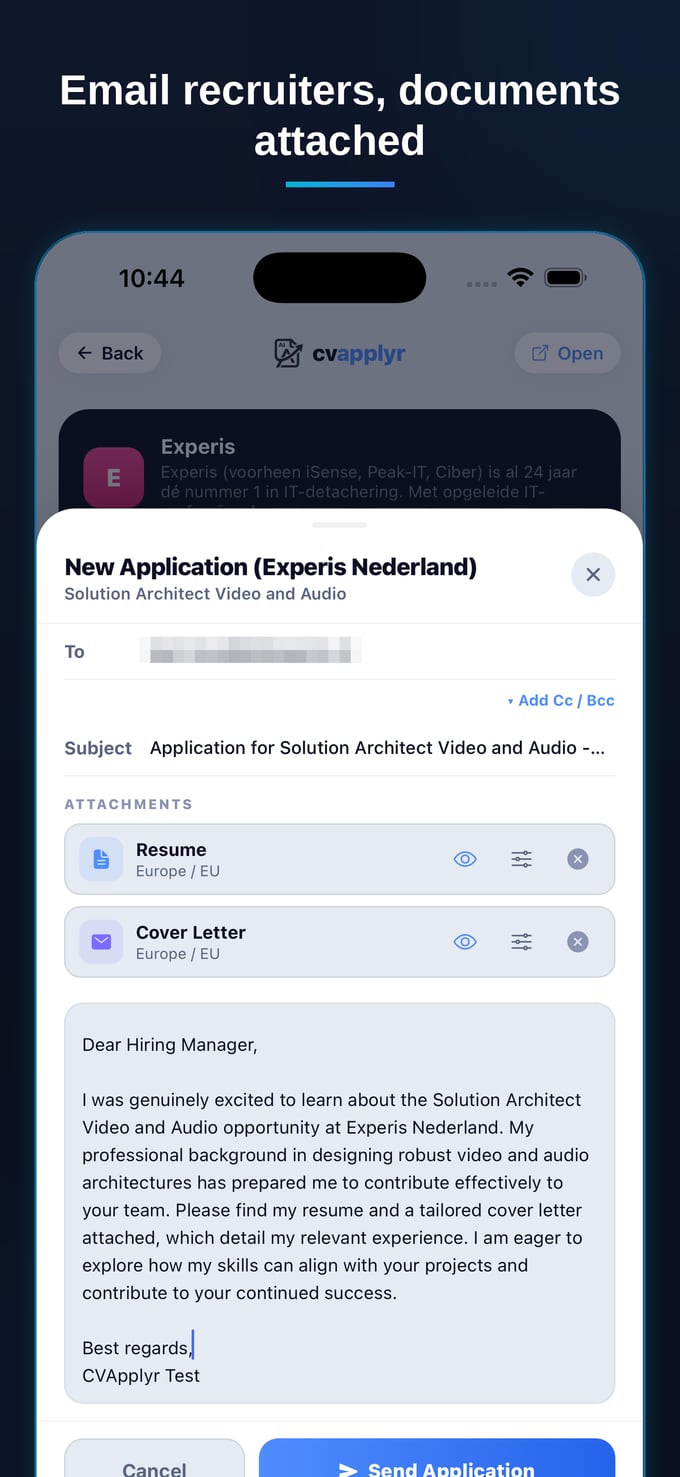
2. Day 3 and Day 7 — follow up on a schedule, not a whim
Most people either never follow up or fire off three anxious emails in one afternoon. Neither works. The sweet spot is a calm cadence: a light first touch around day 3, a short second touch around day 7, and then space. Each message should be a few sentences — restate the role, add one fresh reason you're a fit, and make it easy to reply. You're not chasing; you're staying visible while the decision is still being made.
The hard part isn't writing those notes — it's remembering them across fifteen open applications. When every role lives in its own browser tab and your sent folder is chaos, the follow-up that would have tipped the decision simply never gets sent. A system that nudges you turns "I should follow up sometime" into "follow up on Thursday, here's the draft."
3. Track everything in one place — so step 1 and 2 actually happen
This is the unglamorous step that makes the other two possible. If you can't see, at a glance, which roles you've applied to, who you contacted, and when you last reached out, you will let good opportunities go cold — not by choice, but by overload. The spreadsheet you start on Monday and abandon by Wednesday is not a tracking system; it's a guilt generator.
CVApplyr keeps every application you act on in one Job Hub: the role, its status, the contact you found, and your notes. Following up isn't an archaeology dig through your inbox — it's a glance at the screen and a tap. Because the tracking is automatic, the steps that win replies stop depending on your memory at 11pm.
The quiet benefit of one source of truth is that it kills duplicate effort and awkward mistakes. You'll never email the same recruiter twice by accident, re-apply to a role you already submitted, or blank on a company's name when they finally call. When the whole search is visible in a single view, you can also see your pipeline — how many roles are awaiting a first follow-up, which ones have gone quiet, where a nudge is overdue — and act on it in a few minutes instead of letting the whole thing decay in your sent folder.
The application puts you in the pile. The follow-up is what lifts you out of it. Most people stop at the part with the least leverage — and wonder why they never hear back.
What the after-apply routine looks like in practice
Put the three steps together and your job search changes shape. You stop measuring effort in "applications submitted" and start measuring it in "conversations started." After each submit, you reach the contact CVApplyr surfaces, send the AI-drafted note with your docs attached, and let the Job Hub hold the thread for you. Day 3, you tap follow-up. Day 7, you tap it again. No spreadsheet, no sticky notes, no 11pm panic about which company you already emailed.
None of this guarantees a yes — nothing honestly can. But it tilts the odds in a direction most candidates never even try, and it costs you minutes, not hours, because the tedious parts run themselves. That's the whole game: do the high-leverage things consistently, and make them cheap enough that you'll actually keep doing them.
Make the after-apply steps automatic
Surface a contact, send an AI-drafted note with your docs attached, and track every application in one place — free to start.
Download CVApplyrFrequently asked questions
What should I do right after submitting a job application?
Don't close the tab and forget it. Log the role with the date, find a real contact at the company — a recruiter or the hiring manager — and send a short, friendly note that you've applied and are genuinely interested. Then set yourself a reminder to follow up in a few days. The application is the start of the process, not the end.
Should I email someone after applying?
Yes — a brief, polite message to a recruiter or hiring manager makes your application a name instead of a row in an applicant-tracking system. Keep it to a few sentences: who you are, the role you applied for, one reason you're a strong fit, and an offer to share more. CVApplyr surfaces a contact for a role so you have someone to actually reach.
How soon should I follow up?
A light first touch around day 3 and a second short follow-up around day 7 is a comfortable rhythm for most roles. After that, give it a week or two before checking in again. The aim is to stay visible without being pushy — two or three thoughtful touches over a couple of weeks is plenty.
How does CVApplyr support the after-apply steps?
CVApplyr surfaces a recruiter or hiring-manager contact for a role, attaches your resume and cover letter to an AI-drafted outreach email, and tracks each application's status in one place — so the follow-up steps actually happen instead of slipping through the cracks. It's free to start.