How to Write a Cover Letter with AI (That Doesn’t Sound Like AI)
AI can write your cover letter in seconds. The trick is making it sound like a person who actually wants the job — not a template that's read every job ever posted.

You paste your resume into a chatbot, type "write me a cover letter," and out comes something… fine. Grammatically perfect. Confidently bland. It could be for any job at any company by any candidate — which is exactly the problem. A recruiter who's read four hundred of these can smell the template from the subject line. So you stare at the screen, knowing you should personalise it, and the blank-page dread you were trying to skip comes right back.
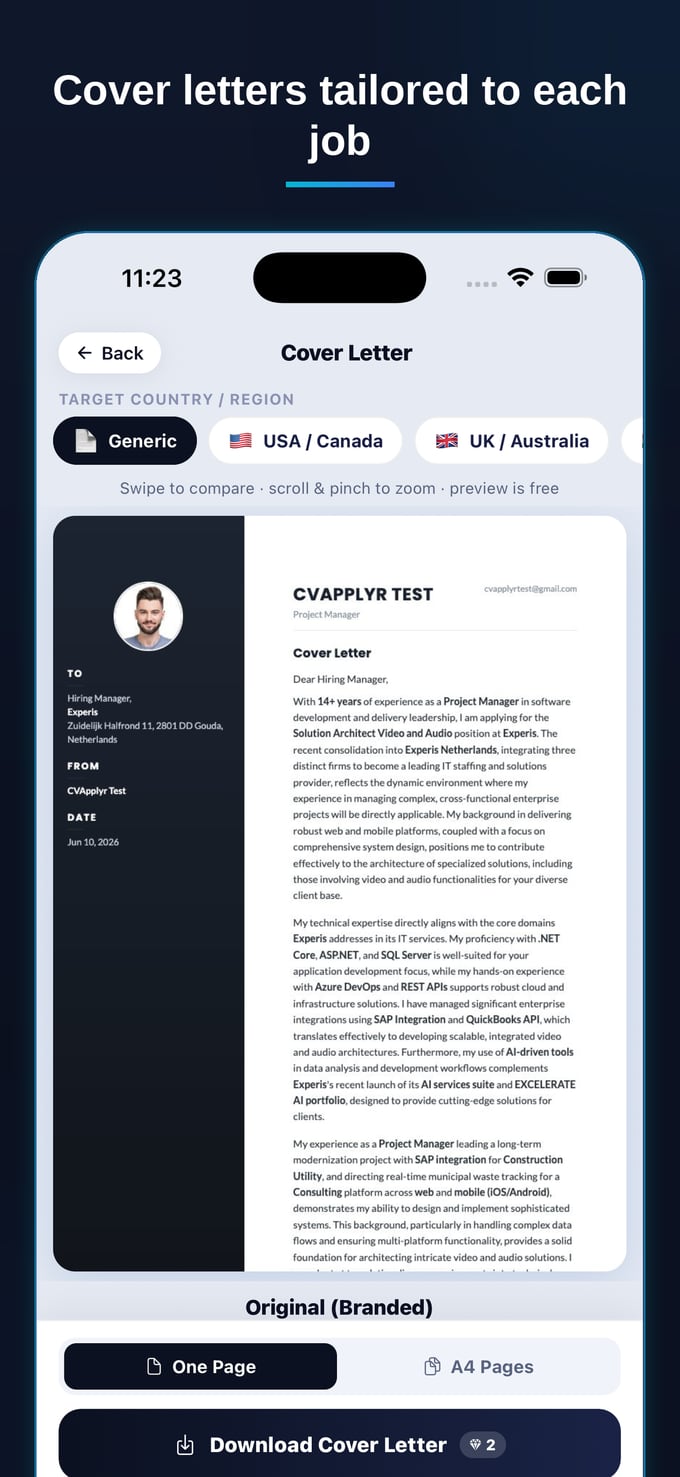
Here's the thing: AI isn't the reason cover letters sound robotic. Lazy input is. Give a model nothing but "write a cover letter" and it has no choice but to reach for clichés. Give it your real resume, a real job description, and a few minutes of editing, and it becomes the fastest way to write a letter that actually sounds like you. Let's break down how to do that — and how CVApplyr does most of it automatically.
Why most AI cover letters sound like AI
The tells are always the same, and once you've seen them you can't unsee them. "I am writing to express my keen interest." "I am a results-driven professional with a passion for excellence." "I would be a great fit for your esteemed organisation." None of it is wrong, exactly. It's just empty — words that survive because they apply to everyone, which means they describe no one.
This happens for a simple reason: a generic prompt produces a generic answer. If the model doesn't know what you did, what this company cares about, or which two skills in the posting actually matter, it fills the gap with safe filler. The robotic feel isn't the AI's writing ability — it's the absence of specifics. Fix the input and the "AI sound" mostly disappears on its own.
The four ingredients of a letter that lands
Whether you write it by hand or with AI, a cover letter that gets read has the same four parts. Keep these in mind and you'll know exactly what to edit.
1. A first line that could only be about this job
Cut "I am writing to apply for…" entirely. Open with why this specific role caught your eye, or a one-line result that maps straight to what they need. The opener is the one sentence a busy recruiter is guaranteed to read — make it earn the next one.
2. Proof, not adjectives
"Strong communicator" is a claim. "Rewrote our onboarding docs and cut support tickets 30%" is proof. AI loves adjectives because they're safe; your job in the edit is to trade at least one of them for a concrete example or number only you could write.
3. A reference to the actual company
One true, specific sentence about why them — a product you've used, a value that matches yours, a problem you'd love to work on — instantly separates you from every template. This is the part generic AI can't fake, because it requires real input.
4. Your voice
If you'd never say "leverage synergies" out loud, don't let it into your letter. Reading the draft aloud is the single fastest test: anything that makes you wince is a phrase to rewrite.
The faster way: let the model start with your real material
This is where AI earns its keep — and where most people get it wrong by starting from a blank prompt. The fix is to feed it the two things that make a letter specific: your resume and the exact job description. That's the whole secret. When the model can see what you've actually done and what the role actually wants, it writes to the overlap between them instead of guessing.
That's exactly the job CVApplyr does for you. It reads the job description and your resume and writes a cover letter tuned to that role — pulling in the skills that match, naming the company and position, and keeping it in your voice. You're not staring at a blank box trying to engineer the perfect prompt; you get a real first draft built from your real material, and your only job is the part that matters: a quick human pass.
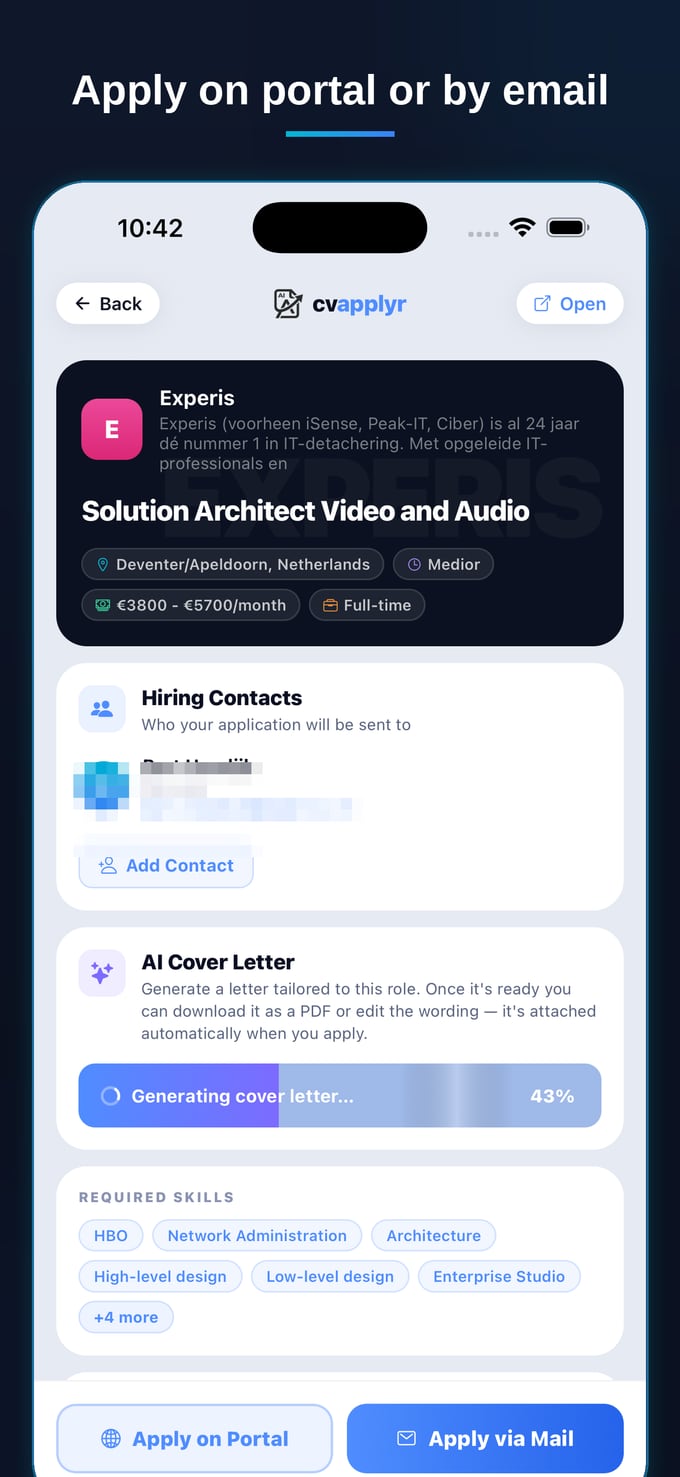
Because the draft starts from your resume and the posting, it skips the clichés a cold prompt produces. The "I am a results-driven professional" filler doesn't appear, because the model already has your actual results to work with. You spend your minute editing for voice, not rescuing a generic template.
How much time this actually saves
Writing a cover letter by hand — opening file, rereading the posting, drafting, second-guessing the opener, reformatting — realistically eats a quarter of an hour, and that's per role. Across a job search that's hours you never get back. Starting from a tailored draft collapses that into a review.
The point isn't to remove the human entirely — it's to move your effort to where it counts. Instead of spending fifteen minutes manufacturing a draft from nothing, you spend one minute sharpening a draft that's already specific. That's the difference between writing three letters in an evening and writing twenty.
The edit pass that makes it yours
However you generate the draft, never send it untouched. The review takes about sixty seconds and it's what turns "a competent AI letter" into "a letter from a real candidate." Run this every time:
Rewrite the opener. If the first line is interchangeable, replace it with something specific to the role. Cut one cliché. Find the most adjective-heavy sentence and swap it for a concrete result. Add one detail only you could write — a number, a project, a real reason you want this job. Check the facts. Names, titles, dates and the company name must match reality; AI occasionally guesses, so verify. Read it aloud. Anything that makes you wince comes out.
The goal was never to hide that you used AI. It's to send a letter so specific to the role that no one would think to ask.
Notice that each of these steps is a judgment call — exactly the part a person should own. The AI handles the blank-page problem and the formatting; you handle the taste. Done this way, "written with AI" and "sounds like you" stop being a contradiction.
Don't forget the format
A great paragraph in the wrong format still reads as off. Cover-letter conventions differ by country — what's expected in the US isn't what a recruiter in Germany or the UK is looking for, from the greeting to whether you include the date and address block. CVApplyr adapts the letter to the country you're applying in, so a role abroad reads the way local recruiters expect instead of looking imported. It's one less thing to get wrong on an application that already has a lot riding on it.
Write the letter in a minute, not fifteen
CVApplyr reads the job and your resume and drafts a tailored cover letter in your voice — ready for your quick edit. Free to start.
Download CVApplyrFrequently asked questions
Can recruiters tell if a cover letter is written by AI?
They can spot a lazy one. Generic openings, vague claims, and that polished-but-empty tone are the giveaways — and those show up whether a human or an AI wrote them. A letter that names the role, references something specific about the company, and reads in your voice doesn't trip those alarms. The fix isn't to avoid AI; it's to give it your real material and edit the output so it sounds like you.
How do I make an AI cover letter sound like me?
Feed it your actual resume and a real job description rather than a blank prompt, then edit for voice: swap any phrase you'd never say out loud, cut one cliché, and add one concrete detail only you could write — a result, a number, a reason you want this specific role. Reading it aloud is the fastest test. CVApplyr starts from your resume and the job so the draft is already in your register, not a stranger's.
What should I always edit in an AI-generated cover letter?
Three things: the opening line (replace any 'I am writing to apply' with something specific to the role), at least one vague claim (turn 'I'm a strong communicator' into a concrete example or number), and the company reference (make sure it mentions something true and specific about them, not a template blank). Then check the facts — names, dates, titles — match reality before you send.
Does CVApplyr tailor the letter to each job?
Yes. CVApplyr reads the specific job description and your resume and writes a cover letter tuned to that exact role — pulling in the skills that match, referencing the company and position, and keeping it in your voice. It also adapts the format and tone to the country you're applying in, so a letter for a role abroad reads the way local recruiters expect.